How to Build a Design Portfolio on Behance/Dribbble That Gets Clients (2025 Ultimate Guide)
INTRODUCTION
In today’s visual-first world, your portfolio acts as your resume.Clients don’t hire designers for their degrees or certificates. They hire designers because they can see your work.
No matter your talent, if your portfolio doesn’t clearly show your skills, clients will overlook you.
Two platforms dominate the creative portfolio space:
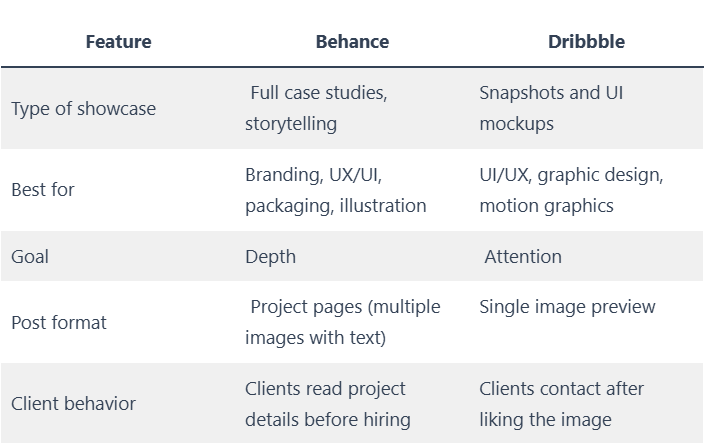
Behance (great for case studies, storytelling, and long-format projects)
Dribbble (great for short visuals, clean previews, and quick discovery)
When used correctly, these platforms can help you:
✔ Build a personal brand
✔ Attract your ideal clients worldwide
✔ Get freelance projects or full-time job offers
✔ Establish yourself as a serious designer
This blog will guide you step-by-step on:
How to create a high-converting Behance or Dribbble portfolio
How to showcase your work (even as a beginner)
What clients really want to see before hiring
Common mistakes designers make and how to avoid them
By the end of this guide, you will create a portfolio that looks great and effectively showcases your skills.
Behance vs. Dribbble: Which Platform Should You Use?
Use both platforms wisely:
▶ Behance = Show your thought process
▶ Dribbble = Show your visuals
The combination is unbeatable.
Before You Upload Anything: Define Your Niche
Clients don’t want a designer who claims to “do everything.”
They want a designer who specializes in something.
Ask yourself:
Do you want to be a UI/UX designer?
A brand identity designer?
A motion or graphic designer?
Define your niche and build your portfolio around it.
Examples of niches:
Minimalist logo and branding designer
UI/UX designer for finance and software startups
Packaging designer for sustainable product brands
Motion designer for social media brands
This helps clients see immediately that you are the right fit.
“If you target everyone, you attract no one.”
Step 1: Choose Your Best 6 to 10 Projects (Quality > Quantity)
Many designers think having a larger portfolio means better chances.That’s wrong.
You only need 6 to 10 high-quality projects.
Don’t upload everything you’ve ever created.
Only showcase work that matches the type of clients you want.
Before adding a project, ask yourself:
“If a client sees only this project, will they want to hire me?”
If not, remove it.
Step 2: Create Case Studies That Show Your Thinking
Clients hire problem solvers, not just “Adobe experts.”That’s why case studies are important on Behance.
A high-converting case study structure:
Case Study Template (Copy and Paste)
- Project Overview
Who was the client? What did they need?
- Problem Statement
What problem were they facing? (Brand confusion, low conversion, etc.)
- Goal / Objective
What was the expected outcome?
- Process / Research
Show brainstorming, wireframes, sketches, moodboards.
- Final Solution
Mockups, UI screens, branding assets.
- Results
Improved sales? Increased traffic? Better brand recall?
- Tools Used
Figma, Illustrator, Photoshop, etc.
Example:
“The client wanted a brand identity that attracts eco-conscious buyers and reflects minimalism.”
Clients want to see the steps: before, process, and after.
Step 3: Present Your Work Like a Branding Agency
Your design may be great, but if your presentation is weak, you risk losing clients.
Use mockups—LOTS of mockups.
Mockup examples:
Logo → showcase on a signboard, business card, packaging
UI design → showcase on mobile screens and desktop mockups
Poster/Graphic → on billboards, magazine covers, and merchandise
Mockups make your work look real, not just theoretical.
Pro tip:
Use consistent mockup styles so your portfolio looks cohesive.
Step 4: Write Engaging Project Descriptions
Bad example:
“Created logo and social media posts.”
Good example:
“Designed a minimal logo and brand visuals that reflect the startup’s mission of making sustainable fashion accessible.”
Your description should explain:
Why you made specific choices
How the visuals connect with the brand values
What the impact was
People are drawn to storytelling, not just visuals.
Step 5: Optimize Your Projects for Discoverability (SEO)
Behance SEO checklist:
Use keywords in Project Title
Add tags (e.g., “branding,” “minimal logo design,” “UI/UX”)
Write a strong project introduction
Example project title:
❌ “Logo project”
✅ “Minimalist Modern Branding Identity for Organic Skin Care Brand”
Dribbble SEO checklist:
Use searchable hashtags (#branding #uiux #webdesign)
Write engaging captions
Share WIPs (work in progress)
Step 6: Create a Cohesive Portfolio Brand
Your Behance or Dribbble portfolio should feel like your own brand.
Checklist:
Same color palette? ✅
Same presentation style? ✅
Same typography in project covers? ✅
Clients should easily recognize your style.
Step 7: Add Social Proof and Client Testimonials
Clients trust other clients more than your words.
If you have testimonials from Fiverr, Upwork, or Instagram, include them as images.
Example:
“Delivered exactly what we needed. Great communication and design sense.”
— Jonathan W., Founder, GreenEarth
Testimonials provide proof of reliability.
Step 8: Make It Easy for Clients to Contact You
Many designers lose clients because they fail to present their contact information clearly.
Add the following at the end of every project:
📩 Email: yourname@email.com
🌐 Portfolio website: yourwebsite.com
📱 Instagram / LinkedIn / Dribbble profile
Don’t make clients hunt for your email; they won’t.
Bonus: What If You Have No Clients or Real Projects?
Create self-initiated projects.
Examples:
Redesign the Zomato mobile app UI
Create a branding project for a fictional coffee brand
Reimagine a product packaging for Nike Care Kit
Clients care about quality, not whether a project is real.
Posting Strategy (to attract leads)
Platform | What to post
Behance | Full case study
Dribbble | Best 1 to 3 screens or shots of your Behance project
LinkedIn / Instagram | Behind-the-scenes and process breakdown
This will drive traffic to your portfolio.
Promotion Tip (Many designers miss this)
After publishing your project on Behance, do the following:
Share it in design communities (Facebook groups, Reddit, LinkedIn groups)
Tag the tools you used (Figma, Adobe, Canva)
Comment on trending Behance projects (engage with value, don’t spam)
Engagement leads to visibility, which increases your chances of being featured.
How to Get Clients Through Your Portfolio (DM Script)
Send this message to leads on LinkedIn or Instagram:
“Hi, I recently helped brands in your industry improve their visual identity and engagement through strategic design. I have a quick concept idea for your brand—would you like me to share it?”
It’s short, confident, and focused on value.
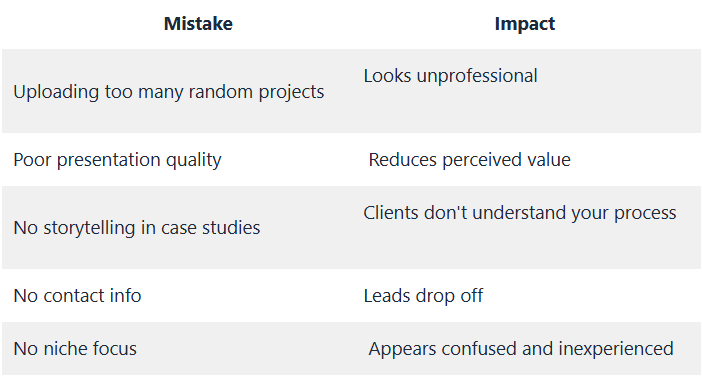
Common Mistakes Designers Make (Avoid These)
Tools to Make Your Portfolio Look Professional
CONCLUSION
A Behance or Dribbble portfolio doesn’t just display your work—it establishes your brand.
To attract high-paying clients:
👉 Show your expertise
👉 Present your process
👉 Use visuals that convey value
Clients don’t pick the best designer. They choose the designer who communicates best.
Your portfolio should illustrate not only what you designed but also why you designed it.
